Overview:
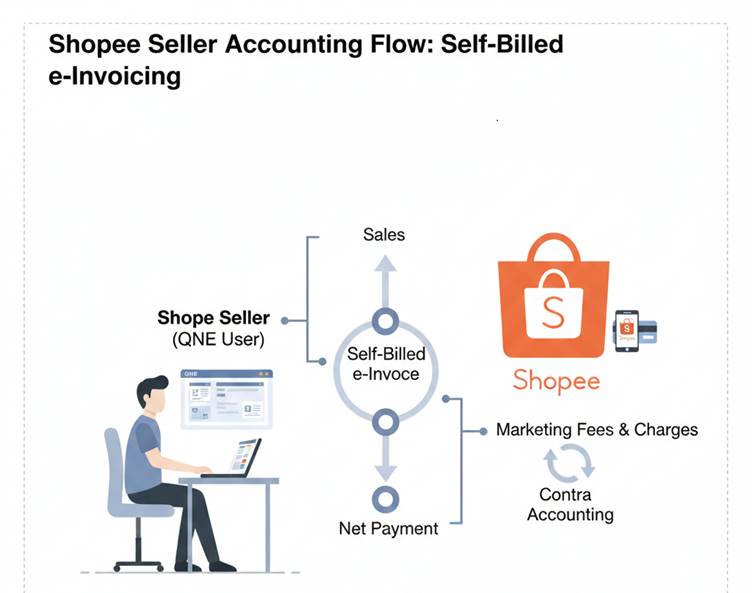
This article explains how Shopee sellers using QNE should record their sales, payments, and platform charges in compliance with e-Invoice requirements.
Since Shopee issues a Self-Billed e-Invoice to sellers and collects payment on behalf of the buyer, the accounting treatment in QNE is different from normal direct sales.
Scenario:
You sell products on Shopee. Shopee issues a self-billed e-Invoice to you for the sales, deducts marketing fees, and pays you the net amount.
You need to record:
- Sales
- Shopee fees
- Payment received
- Contra between Shopee customer & supplier accounts
This article shows you exactly how to record each step in QNE.
Solution:
1. Recording Shopee Sales in system
- Create Shopee as customer in QNE
- Create Sales Invoice but no need submit e-Invoice as Shopee has proceed self-Billed e-Invoice
- No need to include under Consolidated e-Invoice in QNE
Dr Shopee
Cr Sales
2. Receive Payment from Shopee
- Create under Customer Receive Payment
- Knockoff with invoices
Dr Bank
Cr Shopee
3. Recording Expenses Charged by Shopee (E.g. Marketing Fee)
- Create Shopee as Supplier in QNE
- Record in Purchase Invoice or Bill entry, update e-Invoice UUID column
- Shopee will send you the validated e-Invoice so no need to do Self-Billed
- Update UUID in the invoice if you want
Dr Expenses Account
Cr Shopee
4. Proceed Contra
- In Journal Entry, select Shopee Supplier Account & Shopee Customer Account
- Record expenses fee
- Proceed knockoff under Shopee Customer Account & Shopee Supplier Account
Was this article helpful?
That’s Great!
Thank you for your feedback
Sorry! We couldn't be helpful
Thank you for your feedback
Feedback sent
We appreciate your effort and will try to fix the article
